
Written by Stephen Leahy · Last updated 30 September 2026
Quick answer: website analytics tracking only records visitors whose browsers allow it and, in the EU and UK, who have given consent. Your dashboard is therefore a sample of your real audience, often around half. To find your own gap, compare consent-independent visit counts with analytics sessions and your consent rate.
Ask most business owners whether their website analytics tracking covers all of their visitors and the answer is a confident yes. It is almost always wrong. Your analytics tool doesn’t count everyone who visits your site. It counts the visitors it is allowed to see, and that can be a surprisingly small share.
In this post, we’ll look at why the gap exists, how to check whether your own site is set up correctly, and how to estimate how much of your traffic you’re actually measuring.
Is your website analytics a full headcount?
No. Tools like Google Analytics and Adobe Analytics work by running a small script in each visitor’s browser. That script only runs if the browser allows it and, in many regions, only if the visitor has agreed to tracking. Anyone who declines, or who uses a browser or extension that blocks tracking, still visits your site. They just never appear in your reports.
The mistake I see most often is the assumption that Google Analytics, Adobe Analytics, or whichever tool you use tracks 100% of users. When leadership hears ‘we track the website’, they picture everyone. We never can, and consent is the main reason.
So the numbers on your dashboard are better understood as a sample of your real audience. The important question is how big that sample is.
Why does cookie consent create the biggest gap?
In the EU and UK, privacy rules (GDPR, together with the ePrivacy rules on cookies and similar technologies) generally require visitors to opt in before analytics and advertising tracking can run. A few years ago many websites simply tracked everyone and offered an opt-out. That approach no longer meets the standard in these regions. Consent has to be freely given, and declining needs to be as easy as accepting.
Regulators are explicit about analytics. Ireland’s Data Protection Commission, in its cookie guidance published in 2020, treats analytics cookies as requiring consent, while noting that first-party analytics are unlikely to be an enforcement priority. The rules differ between countries, and even between US states, so check which apply to the audience you serve and confirm the details with a qualified adviser.
The practical effect is simple: every visitor who says no disappears from your analytics.
How do you check your own site is compliant?
Before you measure anything, make sure your cookie banner actually does its job. A banner that lets tracking fire before consent is both a legal risk and a data-quality problem.
- Open your site in a private browser window.
- Open your browser’s developer tools and find the list of cookies (usually under the Application or Storage tab).
- Look at the cookies before you click anything on the banner. If analytics or advertising cookies are already set, tracking is starting without consent.
- Click “reject all” and check again. The same cookies should not appear.
- Check that rejecting is as easy as accepting.
If any of these checks fail, fix them first. A consent management plugin is the simplest route for most WordPress sites.
How do you measure how much traffic you’re missing?
You can estimate how much of your traffic you see by comparing three numbers.
- Real visits. Take this from a source that doesn’t depend on consent, such as your hosting or CDN statistics or server logs. Filter out bots and crawlers where you can, because they inflate these counts.
- Tracked visits. Take the sessions or users recorded in your analytics tool for the same period.
- Consent rate. Most consent management platforms report how many visitors saw the banner and how many accepted, rejected, or customised their choices.
Here is an illustrative example. These numbers are made up to show the method, not a benchmark.
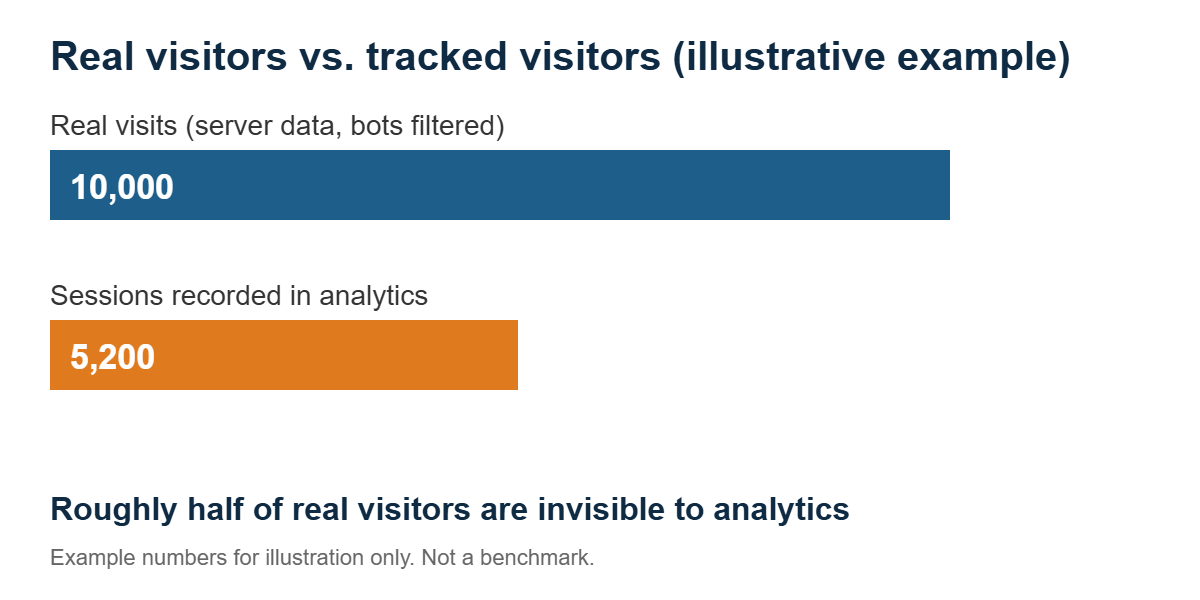
| Measure | Example |
|---|---|
| Real visits (server data, bots filtered) | 10,000 |
| Sessions in analytics | 5,200 |
| Consent rate from your consent tool | About 50% |
| Approximate share of visitors tracked | About 50% |
Sessions and visits are not identical measures, so treat the result as an estimate rather than an exact figure. Even a rough estimate is valuable.
What should you tell the people who read your reports?
Once you know the gap, say so. A sentence like “We currently track roughly half of the visitors who reach the site, the ones who opt in, and can’t see the rest” changes how everyone reads every other chart. It also stops budgets and targets being built on a partial picture.
What else makes website analytics tracking incomplete?
Consent is the largest gap, but it isn’t the only one.
- Ad blockers and browser limits. Some browsers limit how long certain cookies last, and blockers can stop tracking scripts from loading altogether.
- Cross-domain journeys. If your visitors move between your website, a booking tool, and a payment provider, each hop can break the trail.
- Offline outcomes. Phone calls, approvals, and renewals often never reach your analytics, so you can end up rewarding cheap leads instead of good customers.
- Implementation errors. Duplicate tags, broken forms, and changes made during site updates quietly corrupt data.
Can you still attribute leads without cookies?
Often, yes, at least in part. If the links you control (ads, emails, partner sites, social posts) carry campaign parameters such as UTM tags, those parameters can be passed along when a visitor fills in a form and then saved against that lead in your CRM, such as HubSpot or Salesforce. The lead is attributed to a campaign because of the link the visitor clicked, not because you followed them around the site.
This has limits. It only works for traffic arriving through tagged links, the parameters have to survive all the way from the landing page to the form, and how you carry and store them can itself have privacy implications. Get advice on your specific setup before relying on it. We’ll cover this properly in a future post. In the meantime, our guide to essential digital marketing strategies for small businesses covers the wider picture.
Quick checklist
- Know which privacy rules apply to your audience
- Confirm no tracking fires before consent
- Make sure “reject” is as easy as “accept”
- Find out your approximate consent rate
- Estimate the share of visitors your analytics actually sees
- Tell stakeholders that analytics is a sample, not a full count
- Tag your campaign links consistently
Website analytics tracking FAQ
Does Google Analytics track all website visitors?
No. It only records visitors whose browsers allow the tracking script to run and, where consent is required, who have opted in. Everyone else still visits your site but never appears in your reports.
How can I find out how much traffic my analytics misses?
Compare visits from a consent-independent source, such as server logs or CDN statistics with bots filtered out, against sessions in your analytics tool, and check your consent rate in your consent management platform. The result is an estimate, not an exact figure.
Do I need cookie consent for website analytics?
In the EU and UK, generally yes. Ireland’s Data Protection Commission, for example, treats analytics cookies as requiring consent. Rules vary by country, so confirm your obligations with a qualified adviser.
Can I attribute leads without cookies?
Partly. Campaign parameters such as UTM tags on your links can be passed through a form and stored against the lead in your CRM. This only covers traffic from tagged links, and how you carry and store the parameters can have privacy implications.
The bottom line
You can’t measure what you can’t see, but you can measure how much you can’t see. Knowing the size of the blind spot turns vague confidence in your data into something you can actually rely on, and it is the first step toward building a tracking setup that holds up.
About the author: Stephen Leahy is a multi-award-winning digital marketing specialist with more than a decade of experience in SEO, GEO, and web analytics. Read his full profile.