Written by Stephen Leahy · Last updated 30 September 2026
Quick answer: a tracking plan is a single document that lists every event you track, when it fires, what data it carries, and who owns it. It stops different teams defining “lead” or “sale” in different ways, and it is the reference you build, test, and audit your analytics against.
Most analytics problems aren’t technical failures. They happen because nobody wrote down what should be measured, so tags get added ad hoc, names drift, and reports never match. A tracking plan fixes that. Below is what goes into one, a template you can copy, and the mistakes to avoid.
What is a tracking plan?
A tracking plan (sometimes called a measurement plan or tagging plan) is a structured document, usually a spreadsheet, that describes exactly what your website or app should record. Each row is one event, such as a form submission or a purchase, along with the details needed to build and test it.
It answers four questions for every event: what is it called, when exactly does it fire, what extra information does it carry, and where does the data end up?
Why do you need a tracking plan?
- Consistency. One naming convention across every tool means reports line up.
- Fewer gaps. Mapping the whole funnel shows stages you forgot to measure.
- Faster handovers. New team members and agencies can see what exists and why.
- Easier testing. You can’t check that tracking works if you never defined what “works” means.
- Better audits. The plan is your baseline when something breaks. It also supports honest reporting on the share of visitors you can measure, which we covered in how much traffic your analytics actually sees.
The funnel behind every tracking plan
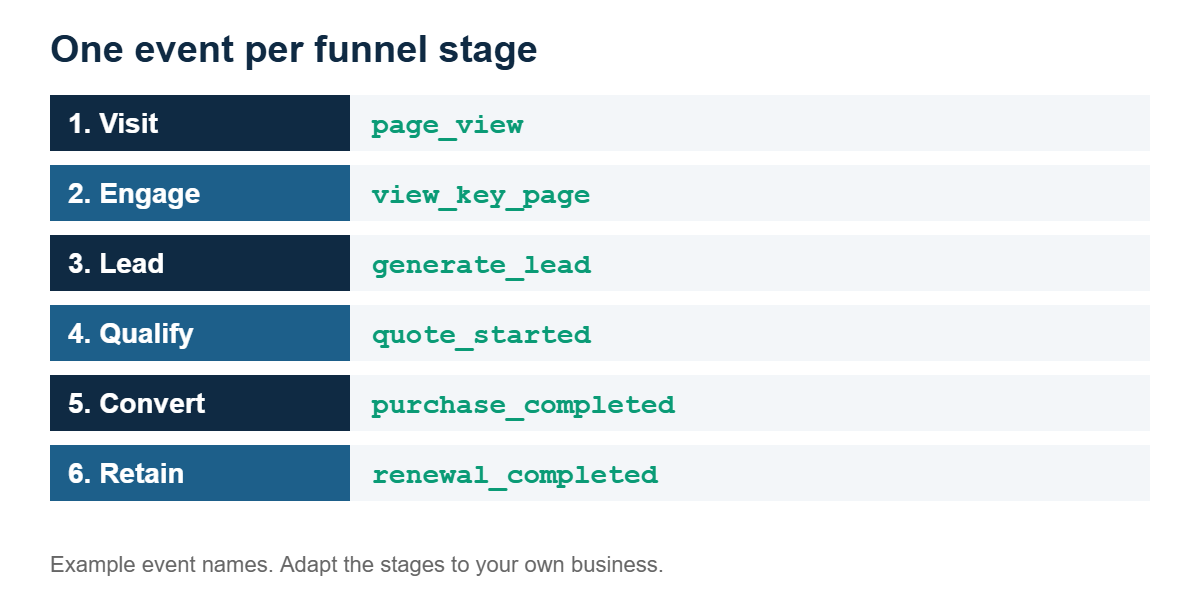
Start by listing the stages a customer passes through, from first contact to long-term value. Then define one event for each stage.
What goes in a tracking plan template?
Use one row per event, with these columns:
| Column | What to write |
|---|---|
| Funnel stage | Where in the customer journey this event sits |
| Event name | One consistent name, for example generate_lead |
| Trigger | Exactly when it fires, such as “form submits successfully” |
| Parameters | Extra data sent with the event, such as form name or order value |
| Identifiers passed | What links it to other steps, such as campaign parameters or a lead ID |
| Consent requirement | What must be true for the event to fire |
| System of record | Where the data ultimately lives, such as analytics or your CRM |
| Owner | The person responsible when it breaks |
| Status | Planned, built, tested, or live |
Here is a short example for a business that wins clients through an enquiry form:
| Stage | Event | Trigger | Key parameters |
|---|---|---|---|
| Engagement | view_pricing | Pricing page viewed | page |
| Lead | generate_lead | Enquiry form submits successfully | form name, campaign parameters |
| Qualification | call_booked | Calendar booking confirmed | call type |
| Conversion | client_won | Contract signed in the CRM | deal value |
How do you write a tracking plan in five steps?
The real value comes when tracking follows a user through every step of the funnel, even into your internal systems, so you can see how customers perform over time. Where server-to-server tracking isn’t allowed, that takes some creative thinking.
- List your funnel stages from first touch to retention.
- Define one event per stage, using lowercase names with underscores and the same names in every tool.
- Choose identifiers that will travel with the visitor, such as campaign parameters and a lead ID.
- Document every handoff, meaning each point where the visitor moves between domains, tools, or systems.
- Assign an owner to each event and schedule a retest after every site release.
Common tracking plan mistakes
- Firing the lead event on a button click instead of a successful submission, which inflates lead counts.
- Tracking everything. Too many events create noise. Track what informs a decision.
- No owner. Nobody notices when an event stops working.
- Ignoring consent. Decide what happens when a visitor declines tracking, not only when they accept.
- Never updating it. A plan that doesn’t match the live site is worse than no plan.
Tracking plan FAQ
What is a tracking plan in analytics?
It is a document that lists every event you track, including its name, trigger, parameters, identifiers, owner, and where the data is stored. It acts as the single reference for building, testing, and auditing your tracking.
What should a tracking plan include?
At minimum: the funnel stage, event name, trigger, parameters, identifiers passed, consent requirements, system of record, and owner for each event.
What tool should I use to create a tracking plan?
A spreadsheet is enough for most small businesses. What matters is that the plan is shared, kept up to date, and has a named owner.
How often should a tracking plan be updated?
Update it whenever you add, change, or remove tracking, and retest after every site release. Review the whole plan at least a few times a year.
About the author: Stephen Leahy is a multi-award-winning digital marketing specialist with more than a decade of experience in SEO, GEO, and web analytics. Read his full profile.