
Written by Stephen Leahy · Last updated 30 September 2026
Quick answer: lead attribution without cookies works by carrying campaign tags from the link a visitor clicks, through to the form they submit, and into your CRM. The lead is tied to a campaign because of the link itself, not because you followed the visitor around your site. It has real limits and privacy considerations, which are covered below.
When visitors decline cookies, most analytics tools lose sight of where they came from. But if that same visitor later fills in an enquiry form, you can still learn which campaign brought them, as long as the campaign information travels with them. This guide explains how, step by step, and where it can go wrong. It builds on our guides to UTM parameter naming and the tracking plan.
This is general information, not legal advice. Privacy rules depend on how you carry and store data, so confirm your setup with a qualified adviser or data protection officer.
How does lead attribution without cookies work?
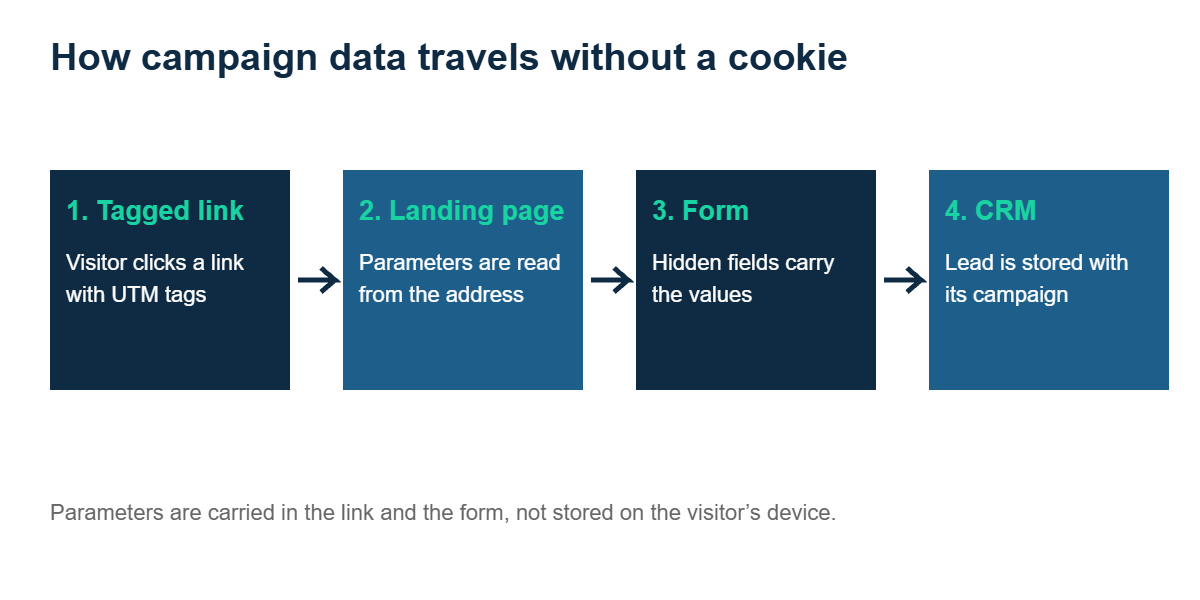
The idea is simple. A link you control carries campaign parameters. The landing page reads them, the form passes them along, and your CRM stores them on the new lead record. No tracking cookie is needed to connect the dots.
Step 1: Tag every link you control
Add consistent UTM parameters to ads, emails, partner links, affiliate placements, and social posts. Use a single naming convention, as described in our UTM parameters guide. Without disciplined tagging, nothing downstream will be reliable.
Step 2: Read the parameters on the landing page
When the visitor arrives, the campaign values are sitting in the page address. A small script, or a feature of your form tool, can read them straight from the URL at that moment.
Step 3: Pass them into the form
Add hidden fields to your enquiry form for source, medium, and campaign, and fill them from the URL values. When the form is submitted, the campaign information goes with the visitor’s details. Check your form tool’s documentation for how it handles hidden fields and URL values.
Step 4: Store them on the lead in your CRM
Passing UTM parameters through to your CRM means attribution depends on the visitor clicking a link you provided, not on cookies. For tagged campaigns, that gets me close to full attribution without relying on cookies.
Create matching fields in your CRM, such as HubSpot or Salesforce, and map each hidden field to its CRM field. Every new lead then arrives already labelled with the campaign that produced it. Later outcomes, such as a booked call or a signed contract, can be reported against the same campaign.
The privacy considerations that matter
Attribution by campaign link is often considered lower risk than following people around a site, but it isn’t automatically free of obligations. Keep these in mind:
- How you carry the values matters. Reading a parameter from the URL and putting it straight into a form is different from saving it in a cookie or browser storage to use on a later page. Storing information on a visitor’s device can itself require consent in the EU and UK.
- Stored with a person’s details, it becomes personal data. Once campaign values sit on a named lead record, they are part of that person’s data, so your privacy policy and lawful basis should reflect it.
- Never put personal data in the URL. Tags should describe the campaign, not the person.
- Get advice. Ireland’s Data Protection Commission is a good starting point for guidance on cookies and similar technologies.
What are the limits of this method?
| Limit | What it means |
|---|---|
| Tagged links only | Organic search, untagged links, and direct visits carry no parameters, so they can’t be attributed this way. |
| Multi-page journeys | If the visitor browses several pages before filling in the form, the parameters must be carried from page to page without being stored on the device, or they will be lost. |
| Redirects | A redirect that strips the address parameters breaks the chain. |
| Form visitors only | You learn the source only for people who submit a form, not for everyone who visited. |
| Tagging discipline | One misspelled campaign name splits your data. |
How to test your setup
- Click a fully tagged test link in a private browser window.
- Submit your form with test details.
- Open the new lead in your CRM and confirm source, medium, and campaign are correct.
- Repeat with cookies rejected, to prove the method works without them.
- Retest after every site or form change.
Used alongside an honest view of how much traffic your analytics can see, this gives you a dependable way to judge which campaigns really generate leads. See how much of your traffic your analytics actually sees for the bigger picture.
Lead attribution FAQ
Can you track leads without cookies?
Often, at least in part. Campaign parameters on your links can be passed into a form and stored on the lead in your CRM, so the lead is attributed without a tracking cookie. It only covers traffic from tagged links.
Is lead attribution without cookies GDPR compliant?
It can be lower risk, but it depends on how you carry and store the data. Saving values in cookies or browser storage may need consent, and values stored on a lead record become personal data. Get advice on your specific setup.
Do I need a CRM for this?
A CRM makes it far easier, because it stores campaign values on each lead and lets you report on later outcomes. A well-organised spreadsheet can work for very small volumes.
What if a visitor browses several pages before filling in the form?
The parameters need to be carried between pages, for example in internal links, without being stored on the visitor’s device. Otherwise they are lost. Test your full journey to be sure.
About the author: Stephen Leahy is a multi-award-winning digital marketing specialist with more than a decade of experience in SEO, GEO, and web analytics. Read his full profile.