Written by Stephen Leahy · Last updated 30 September 2026
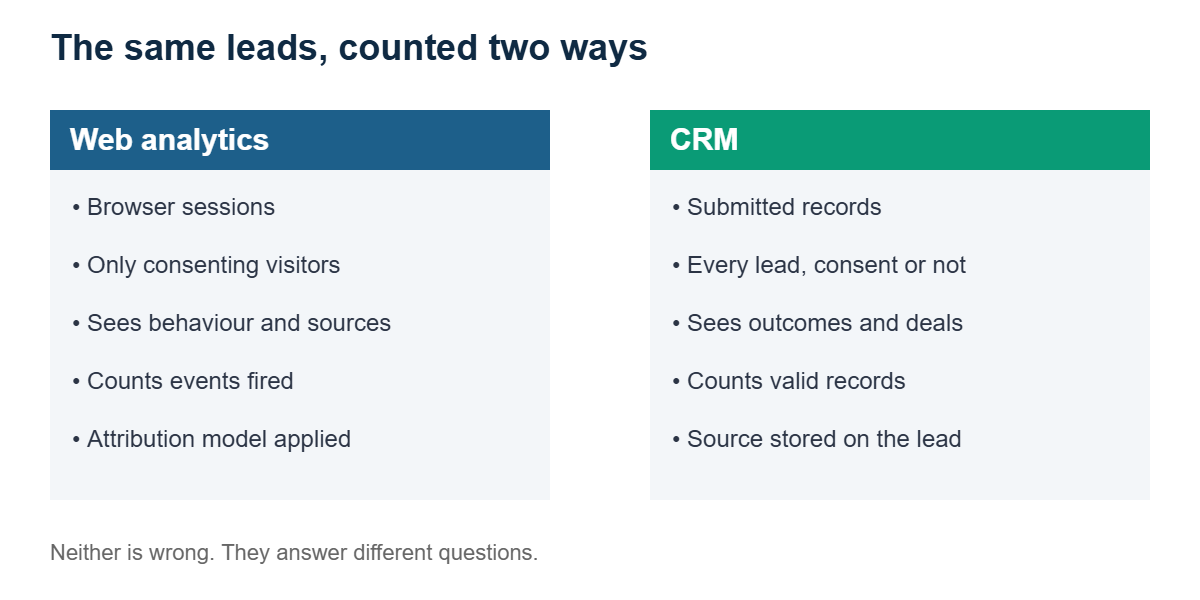
Quick answer: analytics and CRM numbers almost never match because they measure different things in different ways. Analytics counts browser sessions from visitors who can be tracked, while your CRM records leads and deals that people actually submit. Consent, bots, definitions, time zones, and attribution rules all create gaps, so the goal is to explain the difference, not to eliminate it.
Every marketing team has had the meeting: analytics says 240 form submissions, the CRM says 185, and someone asks which one is wrong. Usually neither is wrong. They are answering slightly different questions. This guide shows why the numbers diverge, how to reconcile them, and how to report the difference honestly. It connects directly to our guide on how much of your traffic your analytics actually sees.
Why do analytics and CRM numbers never match?
There are several common causes, and most sites suffer from more than one at a time.
| Cause | What happens |
|---|---|
| Consent | Visitors who decline tracking vanish from analytics, but their form submissions still reach your CRM. |
| Different definitions | Analytics might count a form click or page view as a lead, while the CRM counts only valid records. |
| Spam and test leads | Bots and internal tests can inflate one system and be filtered from the other. |
| Duplicates | The same person submitting twice can be two events in analytics and one record in the CRM, or the reverse. |
| Attribution rules | Each system may credit a different source for the same lead. |
| Time zones and dates | A lead at 11pm can land on different days in each system. |
| Timing of outcomes | A deal won this month may come from a lead created months ago. |
| Tracking errors | Broken tags, changed forms, and missing events quietly drop data. |
Which number should you trust?
Analytics only sees visitors who consent, while your CRM records every lead that submits a form, so the two were never going to match. Joining them up through your internal systems is what gives you a holistic view of customers over time.
For counting real leads and deals, your CRM is usually the system of record, because it reflects records people actually submitted. Analytics is best for understanding behaviour and comparing channels, but it only sees the share of visitors who can be tracked. Analytics sits inside that consent gap, which we explained in our post on cookie banner compliance. Regulators such as Ireland’s Data Protection Commission expect consent before analytics cookies are set.
The right answer is to use each system for what it does best, and to state clearly which one a given report uses.
How to reconcile analytics and CRM data
- Agree the definitions. Write down exactly what counts as a lead, a qualified lead, and a sale, and use the same words everywhere. Your tracking plan is the ideal home for this.
- Fire events only on success. Count a lead when the form submits successfully, not when someone clicks the button.
- Clean both sides. Filter spam and internal test submissions, and handle duplicates consistently.
- Pass a shared identifier. Carry campaign tags and a lead ID into the CRM so individual records can be matched, as described in lead attribution without cookies.
- Compare on the same basis. Use the same time zone, date range, and counting rule in both systems.
- Track the gap over time. A stable difference is normal. A sudden change usually means something broke.
How should you report the difference?
Don’t hide it. A short note such as “Analytics records leads from visitors who consent to tracking, while the CRM records all submitted leads, so the CRM figure is higher” turns a confusing discrepancy into a credible explanation. Leaders trust reports that explain their own limits far more than ones that claim perfect accuracy.
It also helps to report a simple ratio over time, such as CRM leads divided by analytics-recorded leads. You don’t need the ratio to equal one. You need it to stay consistent so you can spot trouble.
Warning signs that tracking has broken
- The gap between the two systems suddenly widens or narrows.
- One channel’s leads disappear from analytics but not from the CRM.
- Leads arrive in the CRM with no source or campaign recorded.
- Conversions drop to zero after a website or form update.
If you see these, run through our five-minute cookie banner test and recheck your event tracking first.
Analytics and CRM numbers FAQ
Why is my CRM lead count higher than my analytics conversion count?
Most often because visitors who decline tracking don’t appear in analytics, while their form submissions still reach your CRM. Differences in definitions, spam filtering, and duplicates also contribute.
Is it normal for analytics and CRM numbers to differ?
Yes. Some difference is expected. What matters is that you understand the causes, document the definitions, and watch for sudden changes.
Which is more accurate, analytics or CRM?
For counting submitted leads and deals, the CRM is usually the more complete record. Analytics is better for behaviour and channel comparison, but it only sees trackable visitors.
How can I match analytics and CRM data?
Agree common definitions, count events only on success, pass campaign tags and a lead ID into the CRM, and compare both systems using the same dates and time zone.
About the author: Stephen Leahy is a multi-award-winning digital marketing specialist with more than a decade of experience in SEO, GEO, and web analytics. Read his full profile.